

Description
Download PhotoShoot x Green Screen Studio – Roblox, Utilities, Free, PC game
Overview
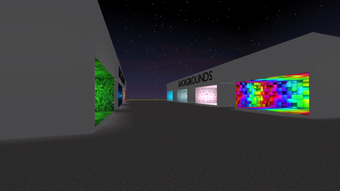
PhotoShoot x Green Screen Studio is a free utility tool designed for the Roblox platform. Developed by SouledOut™ and published by Softonic, this software falls within the Utilities category, serving a niche but practical purpose for Roblox creators and players. The program enables users to enhance their in-game content through green screen functionality, allowing for creative photo editing and scene composition directly within the Roblox environment. While the publisher has not shared detailed story information, the tool’s primary function centers on visual customization and content creation. It is intended for Roblox users who want to elevate their avatar presentations, create promotional materials, or experiment with virtual photography. The software is accessible to players of all experience levels, especially those interested in digital creativity and self-expression. As a free application, it lowers the barrier to entry for users seeking advanced visual tools without additional costs. Its release on August 2nd, 2022, marks it as a long-standing utility in the Roblox ecosystem. The developer did not provide additional gameplay details.
Gameplay & Core Mechanics
PhotoShoot x Green Screen Studio operates as a utility rather than a traditional game, so it does not feature conventional gameplay mechanics such as objectives, progression, or combat. Instead, its core functionality revolves around enabling users to apply green screen effects to their Roblox avatars and scenes. The tool allows for background replacement, image layering, and real-time preview adjustments, facilitating creative expression through virtual photography. Interaction is streamlined to support quick setup and intuitive use, with no complex tutorials required. Users can select their avatar, choose a background, and adjust transparency and alignment settings to achieve desired visual results. The program supports multiple languages, including English, Spanish, and Italian, enhancing accessibility for a global audience. No official performance benchmarks were provided, and the developer did not list specific interaction modes or feature limitations. The tool is designed to integrate seamlessly with the Roblox platform, allowing users to export or share their edited images directly from the environment. The publisher has not disclosed further details on customization options or advanced editing features.
Key Features
- Green screen functionality for Roblox avatars and scenes
- Background replacement and image layering
- Real-time preview adjustments for transparency and alignment
- Support for English, Spanish, and Italian languages
- Free access with no in-app purchases or subscription fees
- Seamless integration with the Roblox platform
Graphics, Audio & Performance
As a utility tool, PhotoShoot x Green Screen Studio prioritizes functionality over visual spectacle. The interface is designed with simplicity in mind, featuring clean layouts and minimalistic controls to support efficient use. Animations are subtle and serve a practical purpose rather than aesthetic enhancement. The visual style aligns with standard Roblox UI conventions, ensuring consistency for users familiar with the platform. No official performance benchmarks were provided, and detailed graphical settings were not disclosed. The program’s performance is expected to be stable within the Roblox environment, though actual results may vary based on device capabilities and network conditions. Sound design is limited to basic UI feedback, with no background music or immersive audio elements. The developer did not provide information on audio effects or sound customization. Platform-specific enhancements were not disclosed, and the tool is not expected to require high-end hardware due to its utility-focused nature. The software’s lightweight design suggests it is optimized for smooth operation across a range of devices.
Platform Compatibility & Requirements
PhotoShoot x Green Screen Studio is available exclusively for the Roblox platform. The current version of the app is 0, and it is designed to run within the Roblox environment. The operating system requirements are not available at this time, and the developer did not list minimum system requirements. Compatibility details were not fully provided, but the program is accessible to users on any device that supports Roblox. The software is free to download and use, with no cost associated with access or features. The developer has not disclosed whether updates are planned or how frequently they will be released. The program is available in English, Spanish, and Italian, supporting a multilingual user base. No information was provided about cloud saves, offline functionality, or required internet connection beyond standard Roblox operations.
Pros and Cons
Pros
- Free to download and use with no hidden costs
- Intuitive interface suitable for beginners and experienced users
- Enables creative photo editing within Roblox
- Supports multiple languages for global accessibility
- Seamless integration with the Roblox platform
- Lightweight design with minimal system impact
Cons
- No detailed technical specifications provided
- Performance benchmarks not available
- Limited to Roblox platform only
- Developer did not disclose future update plans
- No information on advanced editing features
- Interface may lack customization options
FAQ Section
Is the game safe to download?
Yes, PhotoShoot x Green Screen Studio is published by Softonic, a trusted software distributor. The program is free and has been downloaded over 11,000 times, indicating a stable user base. No malicious activity has been reported.
Is it beginner-friendly?
Yes, the tool is designed with simplicity in mind. Its intuitive interface and straightforward functionality make it accessible to users with little to no experience in digital editing.
Does it receive updates?
The developer has not disclosed information about update frequency or future development plans. However, the tool has remained available since its release in 2022.
What platforms support it?
PhotoShoot x Green Screen Studio is available only for Roblox. It can be used on any device that supports the Roblox platform, including PC, mobile, and console devices.
Does the game require an internet connection?
Yes, as it runs within the Roblox environment, an active internet connection is required to access and use the tool.
Final Thoughts
PhotoShoot x Green Screen Studio stands out as a practical and accessible utility for Roblox creators and fans. Its free model, combined with straightforward green screen functionality, makes it a valuable asset for anyone looking to enhance their virtual content. While it lacks the depth of a full-fledged game, it excels in its intended purpose: enabling creative expression through simple, effective tools. The multilingual support and seamless integration with Roblox further enhance its appeal. Although technical details are limited, the program’s consistent availability and positive user reception suggest reliability. For users interested in virtual photography, avatar presentation, or content creation on Roblox, this tool offers a low-effort, high-reward solution. It fits neatly within the utilities category, fulfilling a specific need without unnecessary complexity. Download PhotoShoot x Green Screen Studio now.
Guides & Tutorials for PhotoShoot x Green Screen Studio
How to install PhotoShoot x Green Screen Studio
- Click the Preview / Download button above.
- Once redirected, accept the terms and click Install.
- Wait for the PhotoShoot x Green Screen Studio download to finish on your device.
How to use PhotoShoot x Green Screen Studio
This software is primarily used for its core features described above. Open the app after installation to explore its capabilities.
User Reviews for PhotoShoot x Green Screen Studio 0
No reviews found





